
The Cornerstone
Most offices run on a dozen open browser tabs and a thousand small hand-offs. The Cornerstone pulls everything together in one dynamic, interactive view.
It draws the live signal from every tool in the suite (meetings, trips, decisions, calendar) into a single customizable dashboard: a bird's-eye view of everything that's happened, is happening, or is on its way.
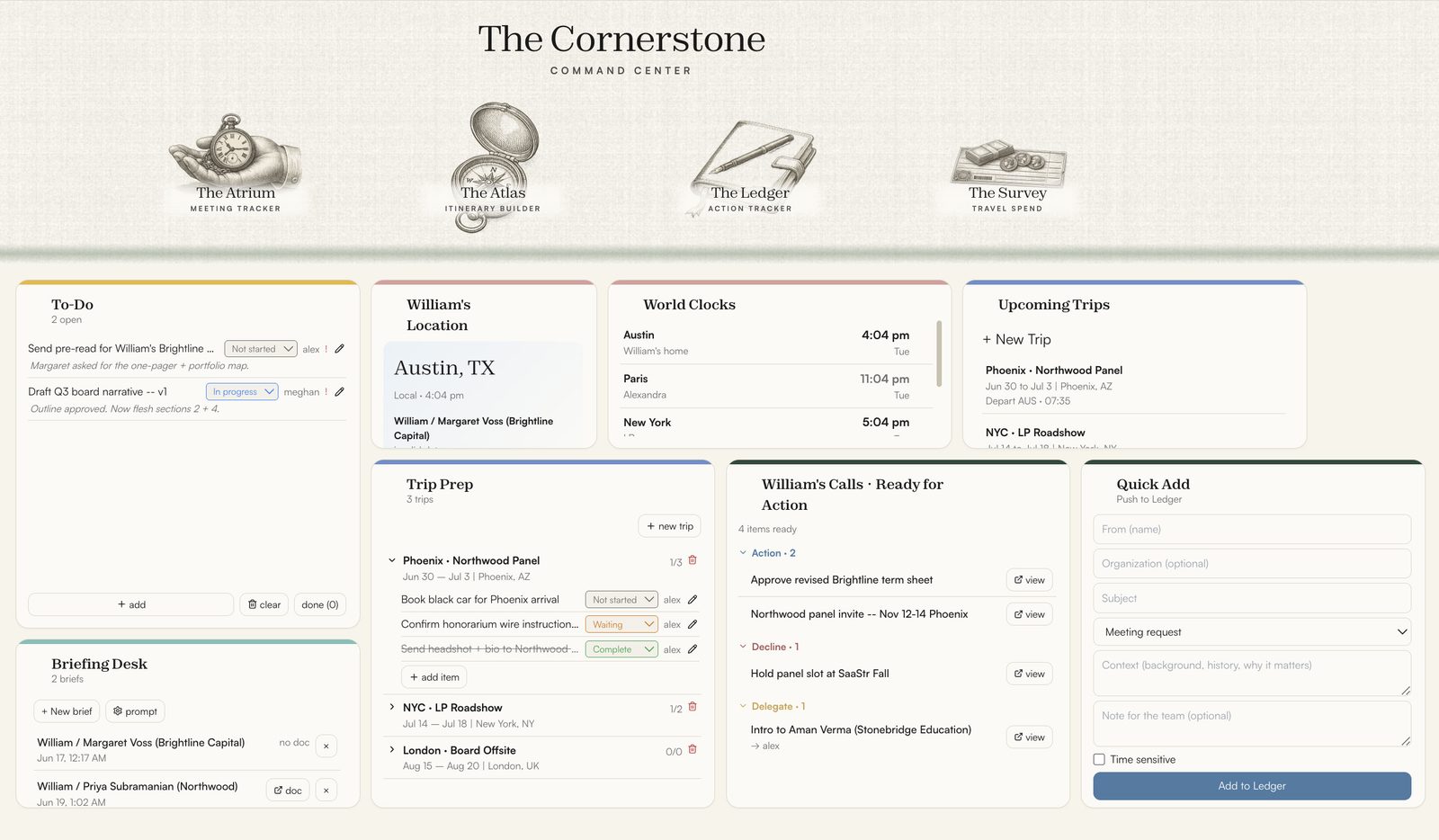
Five tools, one live picture.
01The suite in conversation with itself
The Cornerstone works in both directions: pushing new information out to the other apps while constantly pulling new information in. Five separate tools become one live picture.
02Custom built for your day
Design your dashboard with drag-and-drop widgets, each built around the actual day-to-day of your office. Highlight what's useful, shelve what's not. It's your canvas.
03Widgets that work for you
Today's calendar. Upcoming trips with prep checklists. Briefing notes on demand. Pop-up reminders. The principal's location, pulled live. Fifteen mini-tools designed by an EA, for an EA.
04Collaboration, simplified
A login gate keeps personal and shared work cleanly separated, so your layout follows you, while shared to-do lists, notepads, and trip checklists sync in real time.
See the Cornerstone in your office.
The Build begins with a Blueprint: a two-week diagnostic that decides exactly which tools, configured exactly how your office moves work.